With a legacy in design innovation, CorelDRAW Graphics Suite X5 has long been trusted by professional and aspiring designers. The suite provides significant new and enhanced features to help you create with confidence.
(New)
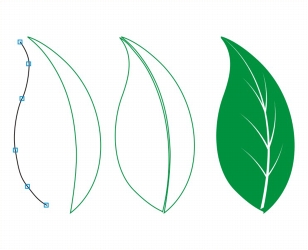
A collection of new drawing tools in CorelDRAW includes a B-Spline tool, an Object coordinates docker, scalable arrowheads, and enhanced connector and dimension tools with a new Segment dimension tool. The B-Spline tool lets you create smooth curves with fewer nodes than curves drawn by using freehand paths. For maximum precision, the Object coordinates docker lets you specify both the size of a new object and its location on the page.
New drawing tools provide additional flexibility and precision.
(Enhanced)
The vastly improved Mesh fill tool lets you design multi-colored filled objects with more fluid color transitions. The new Transparency option lets you reveal objects behind individual nodes. With the new Smooth mesh color option on the property bar, you can achieve color transitions that retain color richness. Any colors added to the mesh nodes now blend seamlessly with the rest of the object. In addition, the number of nodes per mesh has been greatly reduced to make the objects easier to manipulate.
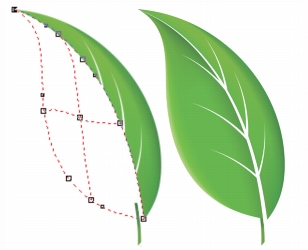
Improved interpolation and new node transparency extend the possibilities of the Mesh fill tool.
(New and enhanced)
When drawing with the curve tools in CorelDRAW, you can show or hide the bounding box, which lets you draw continuously without accidentally selecting the bounding box. In addition, you can specify the amount of space between joined curves. You also have multiple options for the type of join, including extending the curves to an intersection point, defining a radius to add between the segments, or defining a chamfer to add between the segments.
(Enhanced)
The enhanced Color palette manager docker, which includes new and more accurate PANTONE® palettes, makes it easier to create, organize, and show or hide both default and custom color palettes. You can create Web-specific RGB palettes or print-specific CMYK palettes. For optimal color consistency, you can also add third-party color palettes when working with multiple applications.
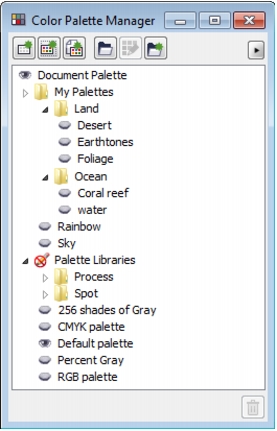
The enhanced Color palette manager docker lets you create and organize custom palettes.
(New)
The new Pixels view in CorelDRAW lets you create drawings in actual pixels, providing an accurate representation of how a design will appear on the Web. Accessible from the View menu, the Pixels mode helps you align objects more accurately. In addition, CorelDRAW lets you snap objects to pixels.
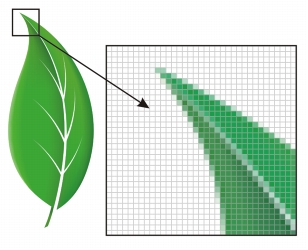
The new Pixels view lets you create objects with precision.
(Enhanced)
Now you can create chamfered, scalloped, or round corners from the Rectangle tool property bar. When you stretch or scale a rectangle, the rounded corners are preserved without distortion, and you have the option of maintaining the original corner radius. In addition, corners are now expressed in units of true radii, which makes them easier to work with.
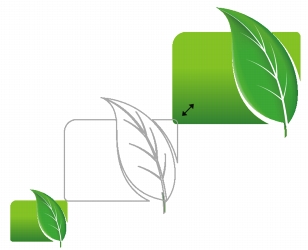
You can stretch rectangles with scalloped, chamfered, and round corners without distorting the corners.
(Enhanced)
In Corel PHOTO-PAINT X5, the improved Objects docker helps you achieve greater workflow efficiency by enabling hierarchical organization of design elements and by making commonly used features more accessible. You can now use nested grouping when organizing a complex image, which facilitates moving groups of objects between multiple applications.
Thumbnails of objects and masks have been improved and are easily adjusted at any time. The reorganized docker also better exposes many of the most commonly used operations. You can now lock objects, which prevents them from being accidentally selected, edited, or moved.
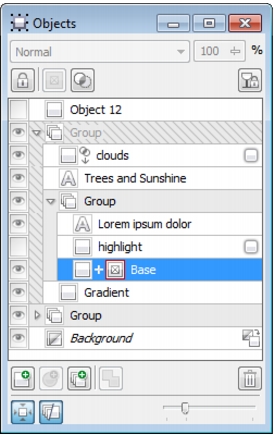
The greatly improved Objects docker enables better organization of design elements.
(New)
The suite looks right at home on Windows® 7 — you can navigate each application workspace by using finger gestures. Support for taskbar thumbnails lets you switch between open documents quickly.
(New)
With Corel PHOTO-PAINT X5, you can experiment with exciting new photo effects for modifying your photos. The Vibrance effect is great for balancing color saturation. It adds richness to colors with low saturation while maintaining colors with high saturation. The Grayscale effect is ideal for removing the saturation of an object, layer, or region of a photo. It also lets you choose the colors used in the grayscale conversion. The Photo filter effect lets you simulate the result of having a camera lens installed when a picture was taken.
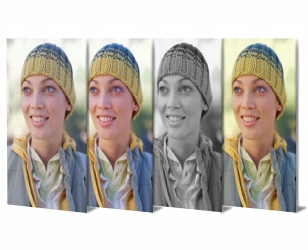
Corel PHOTO-PAINT X5 includes exciting new photo effects.
(New)
Corel PHOTO-PAINT X5 provides greater control when converting images to grayscale by letting you choose the range of colors used in the conversion. This eliminates results that appear washed out because of predominant blues or reds in the original photo. The new dialog box provides a preview window, which lets you adjust the colors to create a more realistic conversion.
(New)
Toolbars can now be locked in position so that you do not accidentally move them while selecting a tool. If you prefer, you can still choose to unlock them at any time and reposition them on your screen.

|
Copyright 2010 Corel Corporation. All rights reserved.