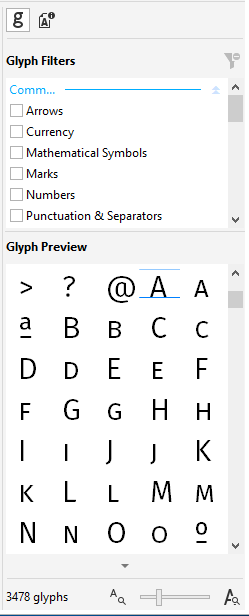
You can also view the glyphs of a font. A typographic glyph corresponds to a single character of a typeface or to a combination of characters. You can choose to view the entire glyph set of a font, or you can apply filters to display only a subset.
Viewing a glyph set with no filters applied
Filters are organized in the following categories:
| • | Common — includes arrows, currency, mathematical symbols, numbers, punctuation marks, and separators as well as CJK symbols and punctuation marks (used in Asian scripts) |
| • | Scripts — includes the scripts that the selected font supports, such as Latin, Greek, Cyrillic, Hiragana and Katakana, Han, Arabic, or Hebrew scripts |
| • | OpenType — includes the OpenType features provided by the selected font such as standard ligatures, discretionary ligatures, fraction, alternate annotation forms, and more. |
You can change the glyph size to display more or fewer glyphs.

You can navigate to specific glyphs by pressing keys or using Alt codes.
| To view the glyphs of a font |

|
| 1 . | Click the font in the Preview pane. |
| 2 . | Click the Glyph set button  on the toolbar. on the toolbar. |
If the Glyph set button is not displayed, click the Show font properties button  to display the Properties pane. to display the Properties pane. |

The features documented in the Help are available in the full version of CorelDRAW Graphics Suite 2019. Some features may not be available in this version of the product.
