Work with vector graphics
In Corel PHOTO-PAINT, you work with bitmaps, also called raster images. Bitmaps are composed of tiny squares called pixels; each pixel is mapped to a location in an image, and has numerical color values. The location and color value data is stored as bits — hence the name bitmaps.
Vector graphics are made up of lines, curves, objects, and fills that are all calculated mathematically. Although you cannot work with vector graphics in Corel PHOTO-PAINT, you can convert vector graphics to bitmaps as you open or import them. This conversion process is called rasterization. You can also copy vector graphics from CorelDRAW and paste them into Corel PHOTO-PAINT.
Vector graphics usually have a smaller file size than bitmaps, so expect file size to increase when you convert vector graphics to bitmaps.
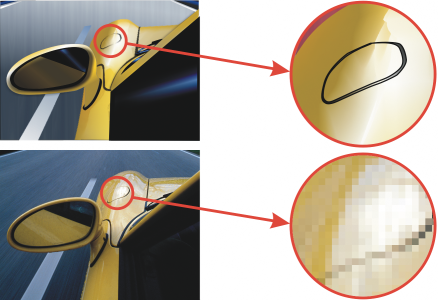
The top illustration is a vector graphic consisting of lines, objects, and fills. The bottom version is a bitmap made up of pixels.
To open a vector graphic


You can copy a vector graphic in CorelDRAW and paste it into Corel PHOTO-PAINT by clicking File  New from clipboard.
To import a vector graphic
 on the toolbar.
You can copy a vector graphic in CorelDRAW and paste it into Corel PHOTO-PAINT by clicking File New from clipboard.