| • | To open or close the toolbox |
| • | To access tools grouped in flyouts |
| • | To move the toolbox |
| • | To change the toolbox display |
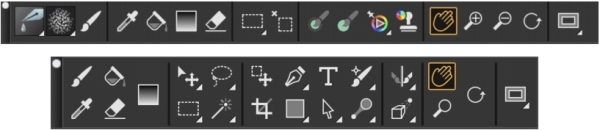
Top: A simpler version of the toolbox. Bottom: A two-row toolbox.
| To open or close the toolbox |

|
| • | Choose Window  Toolbox. Toolbox. |
You can also close the toolbox by clicking the close button on the toolbox header bar.
| To access tools grouped in flyouts |
|
| 1 . | In the toolbox, click and hold the tool icon whose flyout you want to open. |
| A flyout menu of the entire group of related tools appears. |
| 2 . | Click the tool that you want to use. |
| The tool you’ve chosen appears in the toolbox. |
| To move the toolbox |
|
| • | Drag the toolbox header bar to a new location in the application window. |
| To change the toolbox display |
|
| 1 . | Do one of the following: |
| • | (macOS) Choose Corel Painter 2020 Preferences Interface. |
| • | (Windows) Choose Edit Preferences Interface. |
| 2 . | Choose an option from the Toolbox Layout list box. |

