| • | To create a Posterize dynamic layer |
The Posterize dynamic plug-in creates a layer that reduces the number of color levels in the images it floats over.
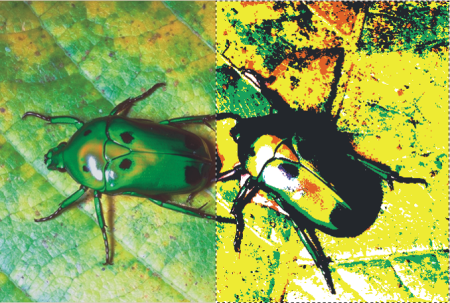
A Posterize dynamic layer modifies the right half of this image.
| To create a Posterize dynamic layer |

|
| 1 | Do one of the following: |
| • | In the Layers panel, choose the Canvas. |
| • | Choose the Rectangular Selection tool  from the toolbox, and then drag in the document window to select an area. from the toolbox, and then drag in the document window to select an area. |
| 2 | In the Layers panel, click the Dynamic Plug-ins button  , and choose Posterize. , and choose Posterize. |
| 3 | In the Posterize dialog box, specify the number of color levels you want. |
| The maximum number of color levels is 128. The value applies to each color channel — red, green, and blue. |
| Corel Painter automatically creates a new layer when you apply the dynamic plug-in. |
Copyright 2017 Corel Corporation. All rights reserved.
