| • | To show onion skin layers |
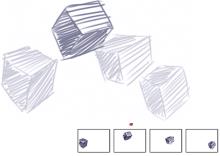
Onion skin view (with Show Onion Skin Layers on). Each frame in the frame stack represents one onion skin layer.
The Frame Stacks panel displays a linear view of the onion skin layers. Each thumbnail represents one onion skin layer, and the thumbnail of the current frame has a red triangle above it.
You can change the current frame by clicking any thumbnail in the Frame Stacks panel. This lets you view a frame in any position of the onion skin sequence. For example, if you want to display the reference frames before the current frame, set the current frame to the far-right position in the panel. If you want to display the frames before and after the current frame, set the current frame to the middle thumbnail in the panel.
| To show onion skin layers |

|
| • | Choose Movie  Show Onion Skin Layers. Show Onion Skin Layers. |
| In the document window, the current frame appears darkest. Each frame moving away is progressively fainter. |
Copyright 2013 Corel Corporation. All rights reserved.
