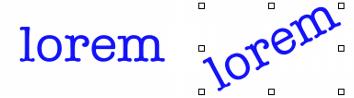
| • | To stretch, rotate, or skew text |
| To stretch, rotate, or skew text |

|
| 1 | Select text using the Layer Adjuster tool  . . |
| 2 | Choose a task from the following table: |
|
Hold down Command (Mac OS) or Ctrl (Windows), and drag one of the corner handles.
|
|
|
Hold down Command (Mac OS) or Ctrl (Windows), and drag one of the center handles on either side of the text.
|
If the bounding box is not shown, click the Layer options button  and choose Show Layer Indicators.
Copyright 2013 Corel Corporation. All rights reserved.

