
| • | To open the Screen Capture window |
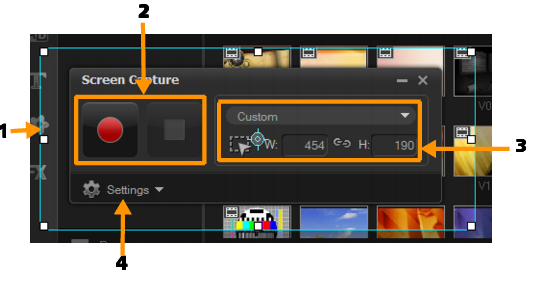
| • | Screen Capture toolbar basics |
| To open the Screen Capture window |
|
| • | You can do one of the following options: |
| • | In the Capture workspace, click Screen Capture to launch the Screen Capture toolbar. The Corel VideoStudio Pro main program window minimizes in the background and the Screen Capture toolbar appears. |
| • | Click Screen Capture  from Record/Capture Option from Record/Capture Option  . . |
| • | Select Corel ScreenCap X7 from the programs list in Start menu (Windows 7 or earlier) or click the program tile on the Start screen (Windows 8). |
| The capture area frame automatically covers the entire screen by default and appears along with the Screen Capture toolbar. |
| Screen Capture toolbar basics |
|
Copyright 2014 Corel Corporation. All rights reserved. Legal Notice
