First line baseline — aligns and distributes text by the baseline of the first line
Last line baseline — aligns and distributes text by the baseline of the last line
Bounding box — aligns and distributes text by its bounding box
You can also align objects with another object quickly, without using the Align and Distribute docker, by clicking ObjectAlign and Distribute and clicking any of the first six alignment commands. The letter next to a command name indicates the keyboard shortcut that you can use to align objects. For example, the letter L next to the Align Left command shows that you can press L to align objects with the leftmost point of the object that is used as a reference point.
Top row: Options for distributing objects horizontally. 1) The Left option evenly spaces the left edges. 2) The Center option evenly spaces the center points. Bottom row: Options for distributing objects vertically. 3) The Top option evenly spaces the top edges. 4) The Center option evenly spaces the center points.
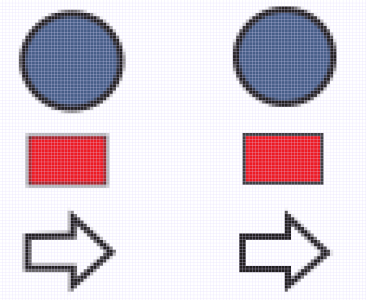
The Align with Pixel Grid feature works with basic curves and shapes. It is unavailable for complex objects and effects such as symbols, text, symmetry groups, vector effects, and PowerClip objects.
The features documented in the Help are available in the full version of CorelDRAW Graphics Suite 2020. Some features may not be available in this version of the product.


 Align and Distribute
  .
.  .
. .
. and Align center vertically button
  in the Align area are enabled.
  .
. , and type values in the X and Y boxes.
 — to align the left edges of objects
 — to align the right edges of objects
 — to align the top edges of objects
 — to align the bottom edges of objects
 — distributes the objects over the area of the bounding box surrounding them
 — distributes the objects over the entire drawing page
 — evenly spaces the left edges of the objects
 — evenly spaces the center points of the objects along a horizontal axis
 — evenly spaces the right edges of the objects
 — places equal intervals between the objects along a horizontal axis
 — evenly spaces the top edges of the objects
 — evenly spaces the center points of the objects along a vertical axis
 — evenly spaces the bottom edges of the objects
 — places equal intervals between the objects along a vertical axis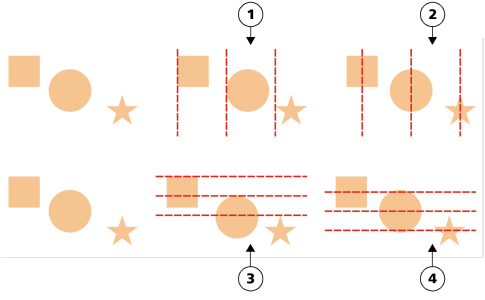
 .
.

 — aligns and distributes text by the baseline of the first line
  — aligns and distributes text by the baseline of the last line
  — aligns and distributes text by its bounding box

