| • | To resize a table cell, row, or column |
| • | To distribute table rows and columns |
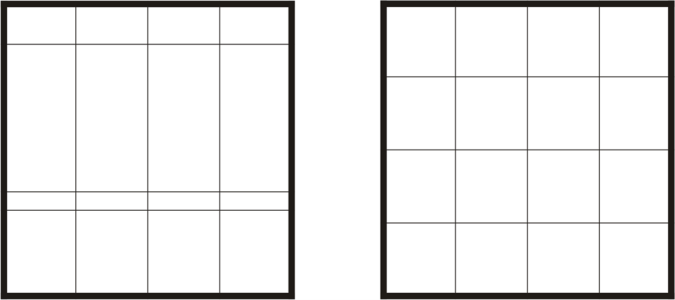
Table rows and columns of different sizes (left) are distributed evenly (right).
| To resize a table cell, row, or column |

|
| 1 . | Click the Table tool  , and then click the table. , and then click the table. |
| 2 . | Select the cell, row, or column that you want to resize. |
| 3 . | On the property bar, type values in the Table width and height boxes. |
| To distribute table rows and columns |
|
| 1 . | Select the table cells that you want to distribute. |
| 2 . | Perform a task from the following table. |

Some features described in the Help are not included in this version of the product, and are available only in CorelDRAW Graphics Suite 2018.
Copyright 2018 Corel Corporation. All rights reserved.

