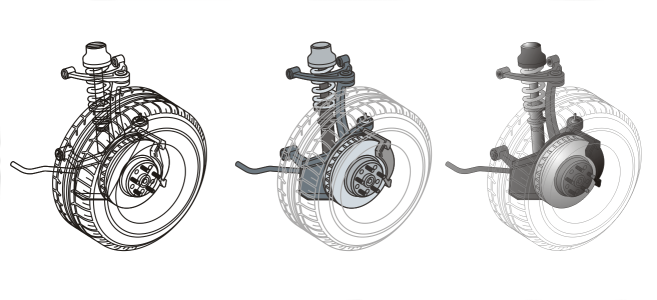
As you work, Corel DESIGNER lets you display a drawing in any of the following modes:
| • |
Wireframe — displays an outline of the drawing by hiding fills, extrusions, contours, and drop shadows; also displays the bitmaps in monochrome. This mode lets you quickly preview basic elements in a drawing. |
| • |
Normal — displays a drawing without PostScript fills or high-resolution bitmaps. This mode refreshes and opens slightly faster than the Enhanced mode. |
| • |
Enhanced — displays a drawing with PostScript fills, high-resolution bitmaps, and anti-aliased vector graphics. |
| • |
Pixels — displays a pixel-based rendition of the drawing, which allows you to zoom in on an area of an object, and then position and size the object more precisely. This view also lets you see what the drawing will look like when it is exported to a bitmap file format. |
| • |
Rasterize complex effects — rasterizes the display of complex effects, such as transparencies, bevels, and drop shadows when in Enhanced view. This option is useful for previewing how the complex effects will be printed. To ensure the successful printing of complex effects, most printers require complex effects to be rasterized. |
The viewing mode you choose affects the amount of time it takes for a drawing to open or be displayed on the monitor. For example, a drawing displayed in Wireframe view takes less time to refresh or open than does a drawing displayed in Simulate Overprints view.
Left to right: Wireframe, Draft, and Enhanced views
| • |
Click View, and click one of the following modes: |

If you are overprinting, it is important to preview the objects in the Simulate overprints mode before printing. The type of objects you are overprinting and the type of colors you are mixing determine how overprinted colors are combined. For more information about overprinting, see Color trapping and overprinting.
To set the default viewing mode, click Layout  Document Options, click General, and choose an option from the View mode list box.

You can quickly switch between the selected viewing mode and the previous viewing mode by pressing Shift + F9.