Print merge
Corel DESIGNER lets you combine text from a data source with a drawing to create personalized documents, such as posters, calendars, business cards, certificates for events, postcards, invitations, or targeted marketing documents, where each printed document contains specific information from a record in a data source, such as a text file or an ODBC data source (a Microsoft Access file).
The print merge workflow involves several steps. First, you create or import a data source file. A data source supplies information for a drawing during the merge. For more information, see Prepare a data source file. Next, you create a form document by inserting fields from the data source into a drawing. A form document provides the structure and layout for a merged document. For more information, see Create a form document. Finally, you merge the documents, producing multiple variations of your artwork. For more information, see Merge data.
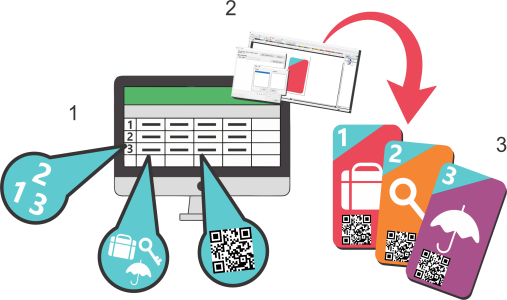
Data source document (1), form document (2), and merged documents (3)