Quick links to procedures on this page:
You can choose a color quickly from the basic Color panel.

You can also choose a color precisely from the floating color palette. The floating color palette displays in the document window and consists of two components that help you choose a color and its intensity: the Hue Ring and the Saturation/Value Triangle.
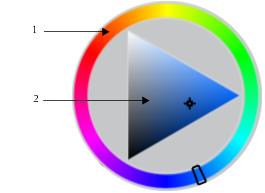
The floating color palette includes a hue ring (1) and a saturation/value triangle (2).

You can also open the Color panels by hovering over the Current Color button  on the toolbox until it is selected.

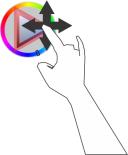
You can also display the color wheel by hovering over the Color Wheel button  on the toolbox until it is selected. You can then choose a color by rotating your index finger around the hue ring, and then hovering over a hue to select a color.
|
3
|
Release Alt to select the intensity. |
You can also display the color wheel by hovering over the Color Wheel button on the toolbox until it is selected. You can choose a color intensity by hovering over an intensity in the Saturation/Value triangle with your index and little fingers until it is selected.
Copyright 2013 Corel Corporation. All rights reserved.
