| • | To rotate a paper texture |
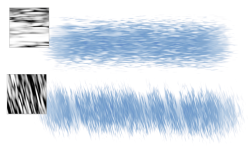
You can rotate paper texture at any angle to achieve the artistic look you want.
A brushstroke applied to a non-rotated paper texture (top) and a rotated paper texture (bottom)
| To rotate a paper texture |

|
| 1 . | Do one of the following: |
| • | On the Brush tool  property bar, click the Grain flyout button property bar, click the Grain flyout button  . . |
| • | Choose Window  Media Panels Papers to open the Papers panel. Media Panels Papers to open the Papers panel. |
| 2 . | Click a paper texture swatch in the Paper Textures area. |
| 3 . | Move the Angle slider. |
