Quick links to procedures on this page:
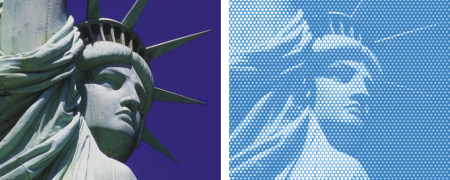
This effect lets you cover an image with pseudo-halftone dots so you can create a Pop Art image.
Before (left) and after (right) applying the Pop Art Fill effect
| 2 . |
Choose Effects  Esoterica Pop Art Fill. Esoterica Pop Art Fill. |
| 3 . |
Choose Image Luminance from the Using list box. |
| 5 . |
Adjust the Contrast slider to mix in the luminance of the control medium. |
| 6 . |
Click the Dab Color chip, and choose a dot color. |
| 7 . |
Click the Background chip, and choose a background color. |
Copyright 2018 Corel Corporation. All rights reserved.