Introducing Corel VideoStudio Pro
Corel VideoStudio Pro guides you step-by-step through the process of capturing, editing, and sharing videos. The application also offers more than a hundred transitions, professional titling capabilities, and simple tools for creating soundtracks.
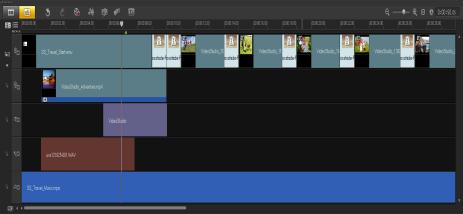
To produce a video, you must capture or import footage from a camcorder or another video source. You can then trim the captured videos, arrange their order, apply transitions, and add overlays, animated titles, voice-over narration, and background music. These elements are organized on separate tracks in Timeline View and appear as chronologically arranged thumbnails in Storyboard View.
Components of a project as displayed in Timeline View
Video projects are saved as Corel VideoStudio Pro project files (*.vsp), which contain information on the location of the clips, on the Library, and on how the movie has been put together. After you finish your movie production, you can burn it to a DVD or Blu-ray Disc, or export the movie back to your camcorder. You can also output your movie as a video file for playback on a computer, or export your movie to mobile devices or the Web.