Quick links to procedures on this page:
• |
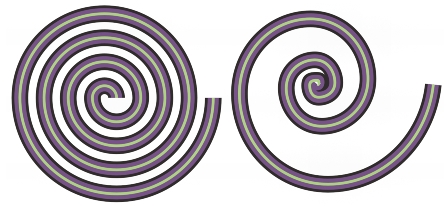
You can draw two types of spirals: symmetrical and logarithmic. Symmetrical spirals expand evenly so that the distance between each revolution is equal. Logarithmic spirals expand with increasingly larger distances between revolutions. You can set the rate by which a logarithmic spiral expands outward.
A symmetrical spiral (left) and a logarithmic spiral (right)
| To draw a spiral |  |
1. |
In the toolbox, click the Spiral tool
 . .
|
2. |
Type a value in the Spiral revolutions box on the property bar.
|
3. |
On the property bar, click one of the following buttons:
|
• |
Symmetrical spiral

|
• |
Logarithmic spiral

|
If you want to change the amount by which the spiral expands as it moves outward, move the Spiral expansion factor slider. |
4. |
Drag diagonally in the drawing window until the spiral is the required size.
|
 |
You can draw a spiral from its center outward by holding down Shift as you
drag.
|
You can also draw a spiral with even horizontal and vertical dimensions by
holding down Ctrl as you drag.
|

|
Copyright 2012 Corel Corporation. All rights reserved.