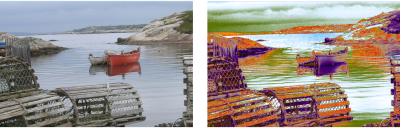
| • | To replace image colors with gradient colors |
You can replace an image’s colors with those of a gradient. This effect applies gradient colors to the pixels of the image, based on their luminance values. For more information, see Using image luminance to create texture.
| To replace image colors with gradient colors |

|
| 1 | Open the image that you want to use. |
| Select part of the image, or use the entire image. |
| 2 | In the Gradients panel (Window  Media Control Panels Gradients), click the Gradient Selector, and click a gradient from the Painter Gradients library panel. Media Control Panels Gradients), click the Gradient Selector, and click a gradient from the Painter Gradients library panel. |
| 3 | Click the Gradient options button  , and choose Express In Image. , and choose Express In Image. |
| 4 | In the Express in Image dialog box, adjust the Bias slider to define how the gradient is mapped. |
| Corel Painter replaces the colors in the image with the colors in the gradient, based on matching luminance. |
Copyright 2016 Corel Corporation. All rights reserved.
