Quick links to procedures on this page:
• |
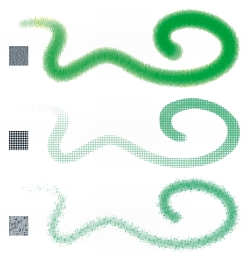
Corel Painter allows you to apply paper texture to the canvas. In general, you can define texture as the roughness or coarseness of a surface, which you can both see and feel. In Corel Painter, however, texture modifies only the appearance of the image, to give you the illusion of surface roughness. It also interacts by subtly or dramatically altering the appearance of brushstrokes.
In addition, certain brushes include a “grainy” method subcategory that is specifically designed to react with the paper texture and grain. Some brushes also let you determine the amount of grain that is revealed by each brushstroke.
One brushstroke applied to three different paper textures.
It is important to note that some brushes, such as those in the Airbrushes category, don’t reveal paper texture in their brushstrokes. This behavior corresponds with that of a traditional airbrush.
| To apply a paper texture |  |
1 |
Click the Paper selector button  in the toolbox. in the toolbox.
|
2 |
In the Paper Textures library panel, click a paper texture swatch.
|
 |
The currently selected paper is saved with the document. This includes
custom paper textures that may not be saved in a paper texture library.
|

You can also choose a paper texture from the Papers panel by choosing
Window  Paper Panels Papers, clicking the Paper Textures library button
in the Papers panel, and clicking a paper texture swatch in the Paper Textures
library panel. Paper Panels Papers, clicking the Paper Textures library button
in the Papers panel, and clicking a paper texture swatch in the Paper Textures
library panel.
|
 |
Some features described in the Help are available only in Corel Painter 12, and are not included in Painter Lite. Visit www.corel.com/painter for more information about Corel Painter 12. |
Copyright 2012 Corel Corporation. All rights reserved.