Quick links to procedures on this page:
• |
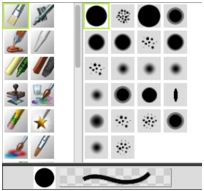
The Brush Library panel displays a brush library’s brush categories and variants. This allows you to choose which variant you want to use. The default brushes are organized in recognizable categories that are named according to traditional art media.
When you choose a brush variant, you can preview the variant’s brush dab and brush stroke at the bottom of the panel. The Brush Library panel also displays the most recently used brushes at the top of the panel, which let you quickly access the last brushes that you used.
The Brush Library panel lets you choose a brush category (left) and a brush variant (right).
The default Corel Painter brush variants display in the Brush Library panel until you open or import a different brush library. In addition, the Brush Library panel displays only the brush variants for the open library.
If you’re looking for a brush from a previous version of Corel Painter, you can reload the old version’s brush library.
| To select a brush category and variant |  |
1 |
In the toolbox, click the Brush tool  . .
|
2 |
Click the Brush Selector on the Brush Selector bar.
|
3 |
In the Brush Library panel, click a brush category, and click a brush variant.
|
 |
Some features described in the Help are available only in Corel Painter 12, and are not included in Painter Lite. Visit www.corel.com/painter for more information about Corel Painter 12. |
Copyright 2012 Corel Corporation. All rights reserved.