Quick links to procedures on this page:
• |
• |
• |
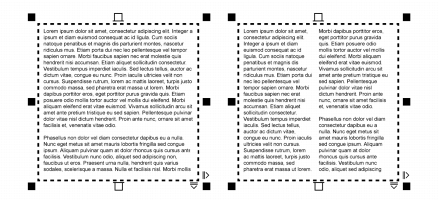
You can lay out text in columns. Columns are useful for designing text-intensive projects, such as newsletters, magazines, and newspapers. You can create columns of equal or varying widths and gutters. You can also apply right-to-left text flow to the columns for bidirectional (bidi) text, such as Arabic and Hebrew (Note that this option is available only for certain languages).
The text in the frame (left) was laid out in two columns (right).
| To add columns to a text frame |  |
1. |
Select a paragraph text frame.
|
2. |
Click Window  Dockers Object properties. Dockers Object properties.
|
3. |
In the Object properties docker, click the Frame button
 to display the frame-
related options. to display the frame-
related options.
|
4. |
Click the Column settings button
 . .
|
5. |
In the Column settings dialog box, type a value in the Number of columns box.
|
| To resize text frame columns | |
1. |
Click the Text tool
 and select a text frame with columns. and select a text frame with columns.
|
2. |
Perform a task from the following table.
|
| To change the flow of bidirectional text in columns | |
1. |
Select a paragraph text frame.
|
2. |
Click Window Dockers Object properties.
|
3. |
In the Object properties docker, click the Frame button
to display the frame-
related options.
|
4. |
Enable the Right-to-left columns check box.
|
 |
The Right-to-left columns option is available only for bidirectional
languages, such as Hebrew and Arabic.
|

|
Copyright 2012 Corel Corporation. All rights reserved.