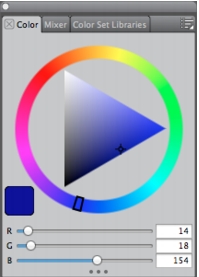
The interactive panels in Corel Painter are single tabbed containers that let you access content libraries, commands, controls, and settings. Panels are stored in palettes. You can store one or multiple panels in a palette. For example, you can reconfigure the panels that you most often use in one palette. You can also arrange panels and palettes in the application window to quickly access the tools and controls that you use most often or to maximize screen space. For example, you can display all color-specific panels in one color palette, or display panels individually.
This palette includes three color-related panels: Color, Mixer, and Color Set Libraries. You can access a panel’s content by clicking its tabs.
Corel Painter includes several panels.
|
Panel
|
Description
|
|---|---|
|
Color panels
|
|
|
Color
|
Lets you choose main and additional colors for painting in Corel Painter documents. For more information, see Using the Color Panel.
|
|
Mixer
|
Lets you mix and blend colors as you would on an artist’s palette. For more information, see Working with the Mixer Panel.
|
|
Color Sets
|
Displays the colors in the current color set so you can organize groups of colors. For more information, refer to Working with Color Sets.
|
|
Navigator panel
|
|
|
Navigator panel
|
Lets you navigate the document window. You can also view document information, such as width and height; X and Y coordinates and the cursor position; context-sensitive information based on a selected tool; and unit information, such as pixels, inches, and resolution. For more information, see The Navigator Panel.
|
|
Layers panel
|
|
|
Layers
|
Lets you preview and arrange all layers in a Corel Painter document. You can add new layers, create layer masks, and delete layers. For more information, see Layers.
|
 |
Some features described in the Help are available only in Corel Painter 12, and are not included in Painter Lite. Visit www.corel.com/painter for more information about Corel Painter 12. |
Copyright 2012 Corel Corporation. All rights reserved.